
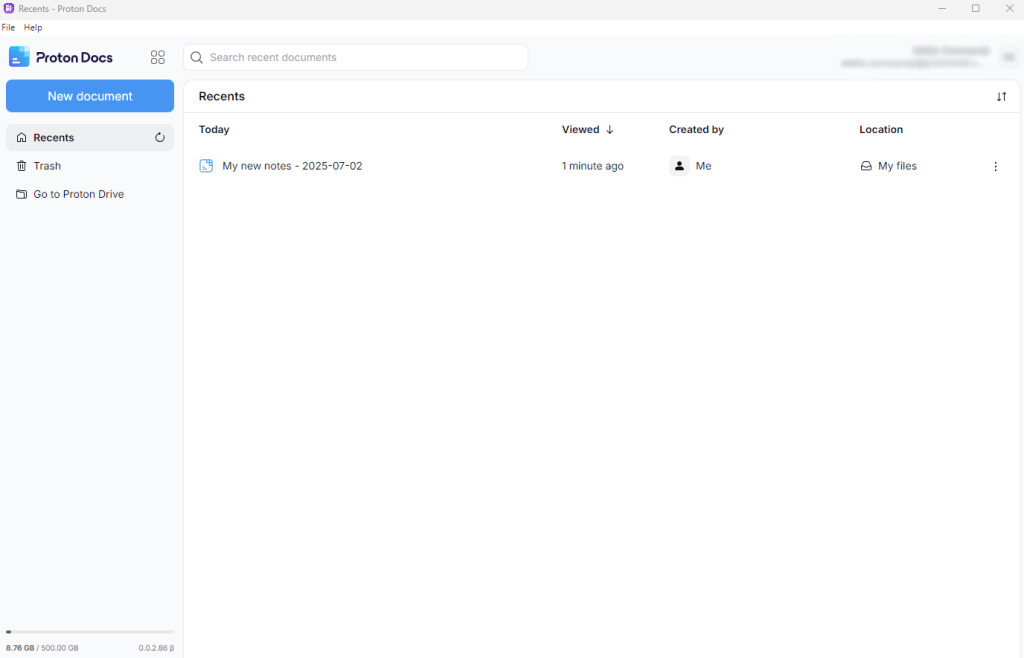
I’ll be honest with you, I built this desktop app for Proton Docs purely out of laziness and personal convenience. Sometimes the simplest motivations lead to the most useful projects.
The Problem That Wasn’t Really a Problem.
Like many people, I’ve been using Proton Docs for my note-taking and document editing. It’s fantastic, encrypted, private, and works great in the browser. But here’s the thing: I found myself constantly hunting through browser tabs to find my Proton Docs tab, getting distracted by other websites, and generally feeling like my note-taking workflow was… messy.
First world problems? Absolutely. But that’s exactly the kind of problem that makes for a fun project.
Enter: Proton Docs Desktop.
So I did what any reasonable developer would do, I spent time building a desktop wrapper for Proton Docs using Electron. The result is a simple, clean desktop app that gives me exactly what I wanted: Proton Docs in its own dedicated window.
What It Does.
The app is beautifully simple:
- Loads Proton Docs in a dedicated desktop window.
- Removes duplicate UI elements that somehow appeared in Electron (more on that later).
- Provides basic keyboard shortcuts for refresh and quit.
- Stays focused – no browser distractions.
- Works cross-platform – Windows, macOS, and Linux.
What It Doesn’t Do.
It doesn’t reinvent the wheel. This isn’t a new document editor or a complex application. It’s literally just a web wrapper that makes Proton Docs feel more like a native desktop app. All the heavy lifting is still done by Proton’s excellent web interface.
The Interesting Technical Bits.
The most interesting challenge was dealing with some quirky behavior where Electron was showing duplicate “New Document” buttons and extra icons that didn’t appear in the regular browser version. I spent more time debugging DOM differences between Electron and regular browsers than I care to admit.
The solution involved some CSS injection and JavaScript DOM manipulation to clean up the interface:
// Hide duplicate elements that only appear in Electron
this.mainWindow.webContents.on('dom-ready', () => {
  this.mainWindow.webContents.insertCSS(`
    .sidebar-header { display: none !important; }
  `);
});
It's a bit hacky, but it works perfectly and gives me the clean interface I wanted.
Why Share This?
Here’s the thing, this app was built entirely for my own convenience. I needed a distraction-free way to access Proton Docs, and now I have it. Mission accomplished.
But then I thought: maybe other people have the same “problem” I do. Maybe someone else wants Proton Docs in a dedicated window without browser tab chaos. Maybe someone else finds this useful.
Or maybe they don’t, and that’s totally fine too. This project scratched my itch, and if it helps someone else, that’s a bonus.
The Code.
The entire project is available on GitHub under the MIT license. It’s about 200 lines of JavaScript and took maybe 4 hours to build (including the time spent figuring out the duplicate button issue).
If you want to try it:
- Clone the repo
- Run
npm install - Run
npm start
That’s it. No complex setup, no configuration needed.
There is also an unpackaged .exe available to just download and run:
https://github.com/sestsom/proton-docs-desktop/releases
A Note on Security.
Since this deals with documents and potentially sensitive information, I want to be clear: this app doesn’t change any of Proton’s security features. It’s just a wrapper around the official Proton Docs web interface. All the encryption, privacy, and security features work exactly as they do in the browser.
The app restricts navigation to Proton domains only and opens any external links in your default browser for security.
The Bottom Line.
This is a simple tool that solved a simple problem for me. It’s not groundbreaking, it’s not complex, and it’s not trying to be the next big thing. It’s just a weekend project that makes my daily workflow a tiny bit more convenient.
And sometimes, that’s exactly what you need.
If you’re someone who uses Proton Docs regularly and wants it in a dedicated desktop window, feel free to check it out. If not, that’s cool too, I already got what I needed from this project.
 Stefan Sommarsjö
Leave a comment